Showing posts with label Oracle. Show all posts

Saturday, 8 September 2018

Creating index in oracle database | Database Performance tuning

Indexes are used to quickly locate data without having to search every row in the database table each time a database table is accessed.
Indexes can be created using one or more columns of a database table, providing the basis for both rapid or random lookup and efficient access of ordered records.
Index is a data structure that improves the speed of data retrieval operations on a database table.

How to create index:
  create index <index_name> on <table_name> (<col1>,<col2>,...);

So, if you want to create index on color column on your paint table and call it paint_color_i, SQL would look like below:
  create index paint_color_i on paint (color);

You can also include more column to index like below:
  create index paint_color_i on paint (color,type);

Thursday, 18 May 2017

SQL Plus Important Commands

How to Connect to sqlplus?
Type "sqlplus" in terminal and enter user-name and password.
On successful login below information will be displayed along with version information
Connected to:
Oracle Database 11g Enterprise Edition Release 11.2.0.4.0 - 64bit Production
With the Partitioning, OLAP, Data Mining and Real Application Testing options

How to exit sqlplus?
Type "quit " to exit from sqlplus

How to login using command line arguments?
Type sqlplus system/pass (It opens a connection to our local database)
To login to schema use below command
sqlplus schemaname/password@SID(Servicename defined in tnsnames.ora file)

How to check location of sqlplus?
Type which sqlplus

How to check sqlplus environment variable?
Type echo $PATH

How to check Oracle SID?
Type echo $ORACLE_SID

How to Start and stop the listener?

Command: lsnrctl using this command we can start/stop the listener by tying start/stop command

Thursday, 20 August 2015

Reading AWR Reports (Basic Approach)

If you are new to the AWR reports, the first thing you should probably do is run the ADDM report for the specific time period. The ADDM report provides root cause analysis of the parts of the system consuming the most time. It is often quicker to start with the ADDM report to help narrow down your area of focus in the AWR report.

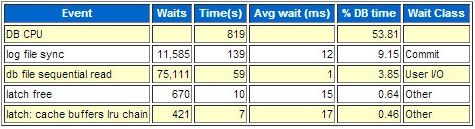
When looking at an AWR report, a good place to start is the "Top 5 Timed Foreground Events" section, near the top of the report. This gives you an indication of the bottlenecks in the system during this sample period.

Once you've identified the top events, drill down to see what SQL and PL/SQL are consuming the majority of those resources. On the "Main Report" section, click the "SQL Statistics" link.

On the "SQL Statistics" section, click the "SQL ordered by ??" link that most closely relates to the wait event you identified in the "Top 5 Timed Foreground Events" section. In this case, the "DB CPU" was the top event, so it would seem sensible to try the "SQL ordered by CPU Time" link first.

You are then presented with the SQL and PL/SQL that are using most of the specified resource during the sample period. You can then attempt to tune these areas to reduce the impact.